

Welcome To My BLOG
INVITE ME WHATSAPP 0852 0707 7076 WECHAT SHIIXIAN FOLLOW TWITTER @SHIXIANZ THANKS

Android
Android

INFINITE CAN YOU SMILE
└ºνє♡ u. (˘⌣˘)

Welcome To My Blog
Hello Guys Welcome to my blog

Kamis, 26 Februari 2015


Rabu, 11 Februari 2015
GIMP


- Download GIMP 2.8.14
- GIMP User Manua
- Chinese Simplified (24.3 MB)
- English (24.2 MB)
- English (United Kingdom) (24.2 MB)
- Japanese (23.6 MB)
- Korean (24.9 MB)

Downloading Nmap
Source Code Distribution (in case you wish to compile Nmap yourself)
This is the traditional compile-it-yourself format. The Nmap tarball compiles under Linux, Mac OS X, Windows, and many UNIX platforms (Solaris, Free/Net/OpenBSD, etc.) It includes Zenmap, the GUI frontend. Nmap is now offered in bzip2 format as well as traditional gzip.
Detailed Linux/BSD/Solaris compilation instructions and options are provided here, though this usually does the trick:
bzip2 -cd nmap-6.47.tar.bz2 | tar xvf -
cd nmap-6.47
./configure
make
su root
make install
Most Windows users install with our Windows executable installer, but we also provide Windows source code compilation instructions.
Most Mac OS X users install with our Mac installer, but we also provide Mac OS X source code compilation instructions.
If you are compiling Nmap anyway, you might prefer to get the very latest code from our SVN source code repository rather than downloading a tarball here.
Latest Nmap release tarball: nmap-6.47.tar.bz2 (or gzip compressed)
Microsoft Windows binaries
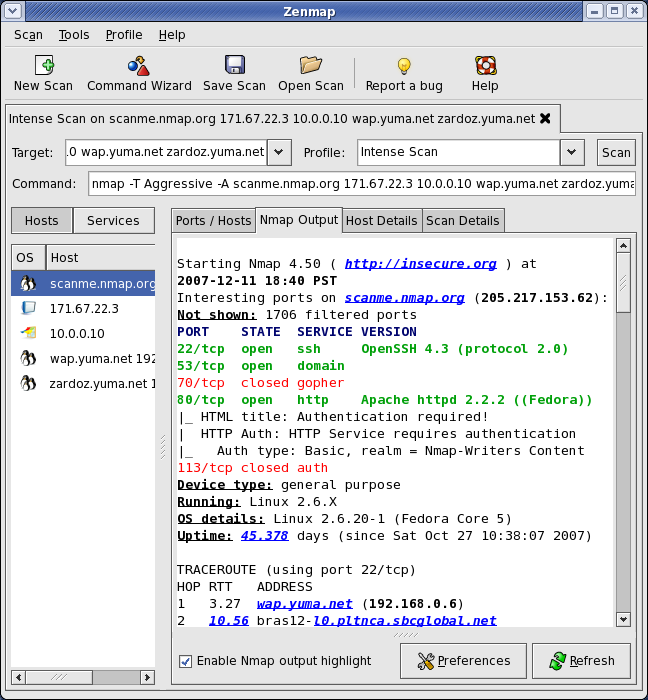
Nmap runs on all versions of Windows since NT, including 2K, XP, Vista, Windows 7, and Server 2003/2008. Please read the Windows section of the Install Guide for limitations and installation instructions for the Windows version of Nmap. In particular, read about the special Windows 2000 (Win2K) dependencies if you use that platform. You can choose from a self-installer (includes dependencies and also the Zenmap GUI) or the much smaller command-line zip file version.
The Nmap executable Windows installer can handle WinPcap installation, registry performance tweaks, and decompressing the executables and data files into your preferred location. It also includes the Zenmap graphical frontend. Skip all the complexity of the Windows zip files with a self-installer:
Latest release self-installer: nmap-6.47-setup.exe
We have written post-install usage instructions. Please notify us if you encounter any problems or have suggestions for the installer.
For those who prefer the command-line zip files (Installation Instructions; Usage Instructions), they are still available. The Zenmap graphical interface is not included with these, so you need to run nmap.exe from a DOS/command window. Or you can download and install a superior command shell such as those included with the free Cygwin system. Also, you need to run the Winpcap and Microsoft Visual C++ Redistributable Package installers which are included in the zip file. The main advantage is that these zip files are a fraction of the size of the executable installer:
Latest command-line zipfile: nmap-6.47-win32.zip
Linux RPM Source and Binaries
Many popular Linux distributions (Redhat, Mandrake, Suse, etc) use the RPM package management system for quick and easy binary package installation. These may not work with Redhat 9 or earlier due to Libc incompatability issues. We have written a detailed guide to installing our RPM packages, though these simple commands usually do the trick:rpm -vhU https://nmap.org/dist/nmap-6.47-1.i386.rpm rpm -vhU https://nmap.org/dist/zenmap-6.47-1.noarch.rpm rpm -vhU https://nmap.org/dist/ncat-6.47-1.i386.rpm rpm -vhU https://nmap.org/dist/nping-0.6.47-1.i386.rpmYou can also download and install the RPMs yourself:
Latest release:
i386 Nmap RPM: nmap-6.47-1.i386.rpm
i386 Ncat RPM: ncat-6.47-1.i386.rpm
i386 Nping RPM: nping-0.6.47-1.i386.rpm
x86-64 (64-bit Linux only!) Nmap RPM: nmap-6.47-1.x86_64.rpm
x86-64 (64-bit Linux only!) Ncat RPM: ncat-6.47-1.x86_64.rpm
x86-64 (64-bit Linux only!) Nping RPM: nping-0.6.47-1.x86_64.rpm
Optional Zenmap GUI (all platforms): zenmap-6.47-1.noarch.rpm
Source RPM (includes Nmap, Zenmap, Ncat, and Nping): nmap-6.47-1.src.rpm
Mac OS X Binaries
Nmap binaries for Mac OS X (Intel x86) are distributed as a disk image file containing an installer. The installer allows installing Nmap, Zenmap, Ncat, and Ndiff. The programs have been tested on Intel computers running Mac OS X 10.6 and later. See the Mac OS X Nmap install page for more details. Users of PowerPC (PPC) Mac machines, which Apple ceased selling in 2006, should see this page instead for support information.Latest release installer: nmap-6.47.dmg
Other Operating Systems
Many other operating systems support Nmap so well that I have no need to create and distribute binary packages myself. You can choose to use the packages below, or compile the source distribution, which is often newer. We have created installation pages for the following platforms:Linux (all distributions)
Microsoft Windows
Mac OS X
FreeBSD, OpenBSD, and NetBSD
Sun Solaris
Amiga, HP-UX, and Other Platforms
Langganan:
Komentar (Atom)


